01 · Dictate a message
Say it. Send it.
Click a text field in the app you’re using. Hold the key and say:
“I’ll be there in ten minutes.”
Release to insert the text, ready for you to check and send.
EXPERIMENTAL · APPLE SILICON macOS · BUILD FROM SOURCE
Your words land at the cursor of the app you’re already in. No dictation window, no copy-paste.
Hold to try itor hold Right Option on your keyboard
Hold Right Option, say your message, and release. Your words appear where you’re typing.
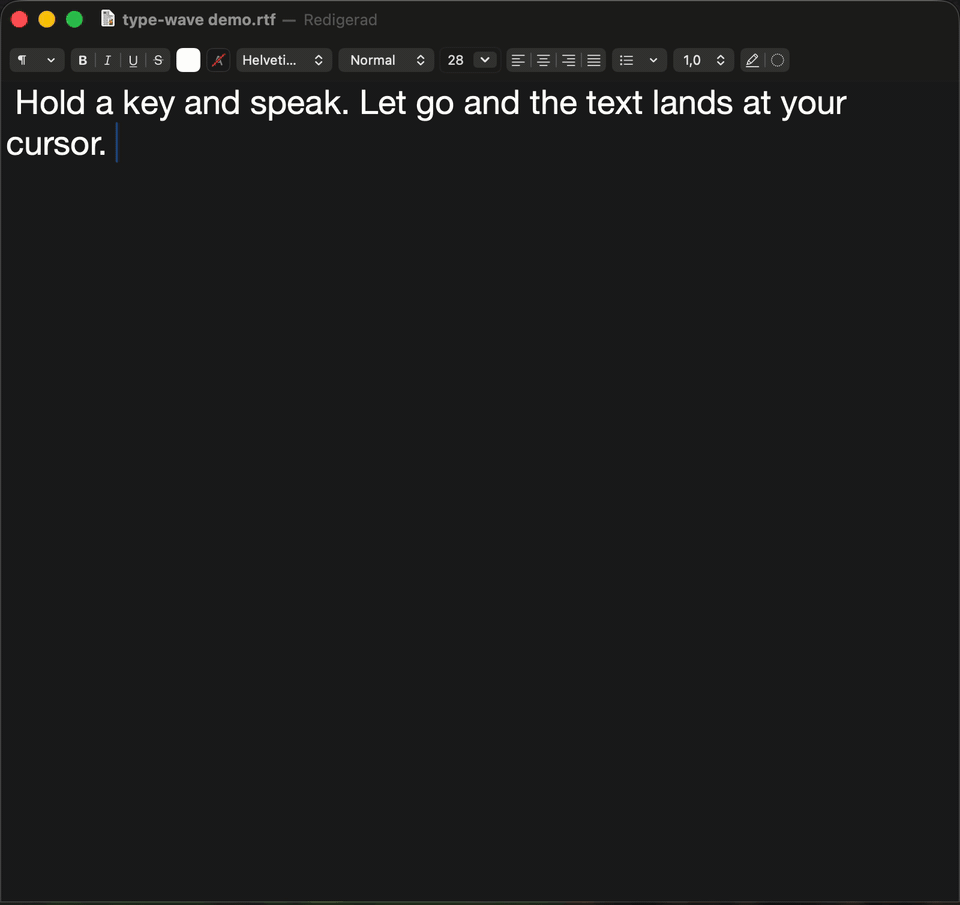
Watch a dictation land in TextEdit. Press play to start the recording.
01 · Dictate a message
Click a text field in the app you’re using. Hold the key and say:
“I’ll be there in ten minutes.”
Release to insert the text, ready for you to check and send.
02 · Correct yourself
With Backtrack turned on:
Backtrack is off by default. It sends your transcript to OpenAI for rewriting and works only in OpenAI mode.
03 · Recover your words
Switched apps before your words arrived? If type-wave detects that change, it holds back the text.
Find the entry in the menu bar, Option-click to reveal it, then insert it where you want it. Text captured under secure input isn’t saved for recovery.
Add names like Björn or product names like type-wave to Custom vocabulary in the menu bar. The same list helps local Whisper and supported OpenAI models spell them your way. It nudges spelling; it doesn’t guarantee it.
Press ⌃ ⌘ ⌫ (Control–Command–Delete) to undo once while the same app is still in front. Use it immediately, before moving the cursor or editing. Re-insert the entry from Recent Insertions to redo.
Your audio streams to OpenAI while you dictate. Requires an internet connection and an OpenAI API key with Realtime access.
Your audio stays on your Mac. After a one-time model download, dictate without an API key or a network connection.
The Talk Key defaults to Right Option. Only the finished transcript is inserted. The floating indicator shows a red waveform while recording and green dots while processing; it never displays your words.
OpenAI uses an encrypted WebSocket and defaults to gpt-live-transcribe. Local mode runs Whisper Large v3 Turbo. Backtrack falls back to the original transcript if its rewrite fails or times out.
Custom vocabulary starts empty. Edits apply from the next dictation without restarting. OpenAI models without keywords support do not use the list; the menu labels it “local only.”
Recent Insertions holds the last 20 entries in memory, never written to disk, and is cleared when type-wave quits. Entries stay masked until revealed. Copying and re-inserting use no network. When secure input is detected at the start or end of a dictation, its text is withheld from this history.
Undo checks the app, not the text field or cursor position, and works only once per insertion. It refuses if the app cannot be confirmed or permissions are missing. Secure input can prevent the shortcut from reaching type-wave. A green or red indicator reports the outcome without showing your text.
Switch to local Whisper and type-wave goes fully offline.
Choose local Whisper in the menu bar. After the model download, type-wave transcribes your voice on your Mac. Your voice is captured, transcribed, and inserted without a byte leaving your Mac — no API key, no cloud, no dictation-time network. The only fetch is a one-time, credential-free download of the pinned model; after that, local mode runs with no network at all. (In the default OpenAI mode, your audio does stream to OpenAI while you dictate — privacy is what you get when you choose local.)
No network while you dictate
What type-wave keeps, it keeps in memory. The last 20 insertions stay in the Recent Insertions menu so you can recover a lost dictation — masked in the menu until you deliberately reveal one, never written to disk, and gone when type-wave quits.
From source with Nix and Zig on an Apple Silicon Mac. No binary to download — you build it yourself.
Apple Silicon Mac — Intel Macs aren't supported
Nix with flakes (or a matching bare Zig nightly)
OpenAI mode: an OpenAI API key with Realtime access
Local mode: a signed helper and a one-time, credential-free model download; no API key
macOS permissions on first run: Input Monitoring (observe the Talk Key), Accessibility (insert text), Microphone (capture audio)
Audio streams to OpenAI while you dictate. Replace sk-... with your OpenAI API key before running the commands.
Start in the folder where you keep your projects. Already cloned the repo? Open it and skip the first two lines. Keep this Terminal window open while trying dictation.
git clone https://github.com/dbgeek/type-wave.gitcd type-waveexport OPENAI_API_KEY=sk-...nix develop --command zig build runFollow the prompts for Microphone, Input Monitoring, and Accessibility. You can review these in System Settings → Privacy & Security.
In the type-wave menu bar, choose Transcription Backend → OpenAI. Wait until it is ready, click a text field, hold Right Option, speak, and release.
Build the app and fetch Whisper Large v3 Turbo once while online. After the model is installed, dictation runs entirely on your Mac.
Local transcription needs the installed, signed Whisper helper. Before running these commands, complete the one-time signing certificate setup in Keychain Access. No API key is required.
Start in the folder where you keep your projects. Already cloned the repo? Open it and skip the first two lines. Keep this Terminal window open while trying dictation.
git clone https://github.com/dbgeek/type-wave.gitcd type-wavenix develop --command zig build install-agent~/.local/bin/type-wave --install-model~/.local/bin/type-waveFollow the prompts for Microphone, Input Monitoring, and Accessibility. You can review these in System Settings → Privacy & Security.
In the type-wave menu bar, choose Transcription Backend → Local — Whisper Large v3 Turbo. Wait until it is ready, click a text field, hold Right Option, speak, and release.
Stop the foreground run with Control-C. First, follow the one-time signing certificate setup to create the required “type-wave dev” identity in Keychain Access. Then run these commands from the cloned repo:
nix develop --command zig build install-agent~/.local/bin/type-wave --set-keylaunchctl bootstrap gui/$(id -u) ~/Library/LaunchAgents/me.ba78.type-wave.plistThe key command stores your API key in the login keychain for background use. Review permissions for the installed app and confirm your backend in the menu bar. For an existing installation, follow the packaging guide’s reload instructions.
HOW IT WAS BUILT
Charted with wayfinder, part of Matt Pocock's AI Skills for Real Engineers. The plan for this site was mapped as decision tickets and resolved one at a time before a line was built.